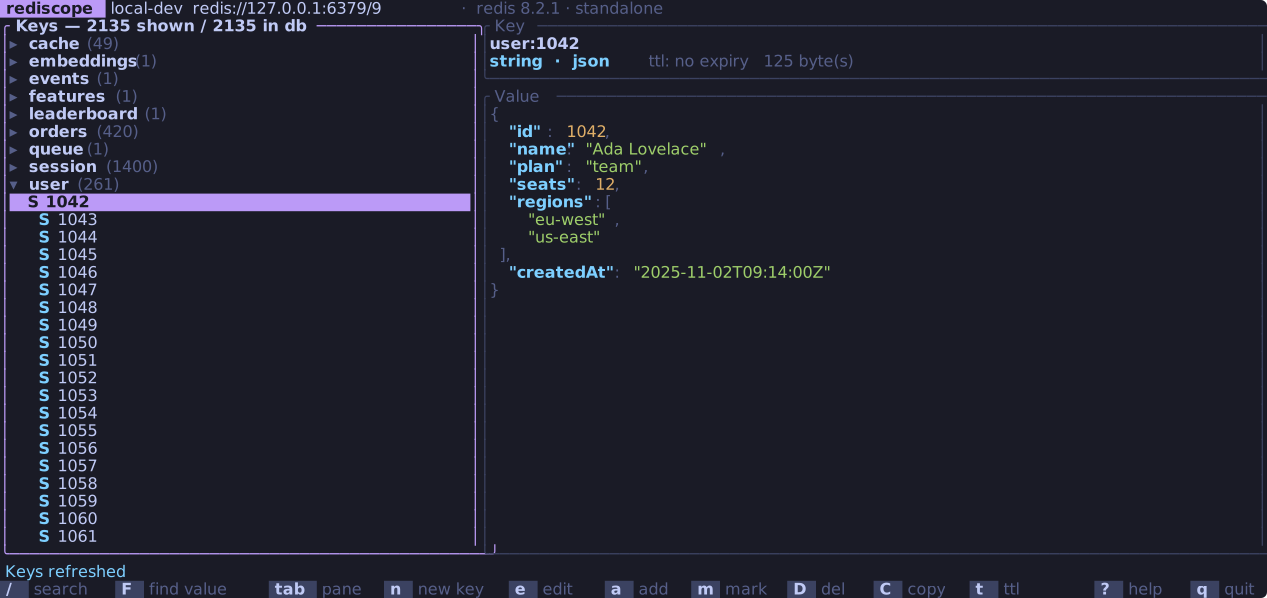
Browse the keyspace as a folder tree, read and edit every value type
(gzipped and MessagePack ones too, and Redis 8 vector sets), watch TTLs
count down, find out which prefix is eating your RAM, and drop into a raw
command console. Works with Redis, Valkey, KeyDB and Dragonfly. One static
binary. No Electron, no Python runtime.
curl -fsSL https://raw.githubusercontent.com/TarasKovalenko/Rediscope/main/install.sh | sh
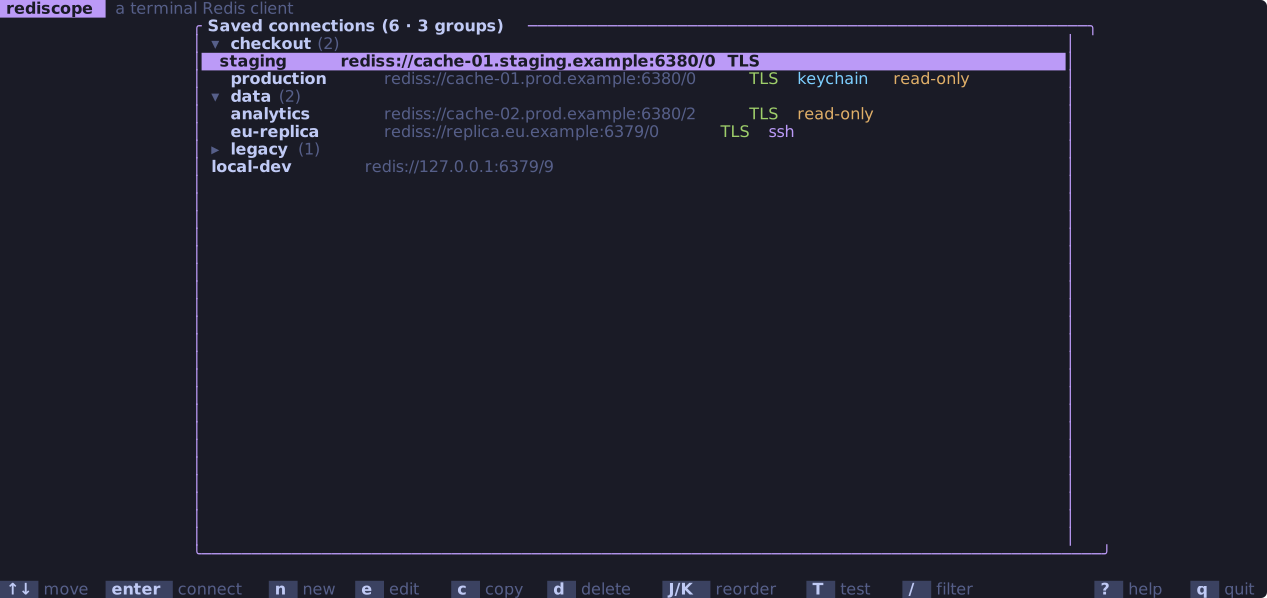
Saved profiles grouped by product, one folder per group that folds away. Each row shows what it is: TLS, an SSH tunnel, the read-only flag. v flips back to a flat list.
What it does
Browse
The keyspace as a folder tree, split on :, with a count on every folder.
Ctrl+P jumps to any loaded key or runs any action by a few letters of its name: u42prof finds app:user:42:profile.
/ searches by pattern, F searches inside values.
Live TTLs: keys leave the tree as they expire, and so do hash fields with an expiry of their own (Redis 7.4+, Valkey 9).
Scans, never KEYS, so a big keyspace stays responsive. + loads more: 5,000 keys at a time up to 50,000, or 1,000 elements of a big key up to 10,000.
f filters one hash, list, set, sorted set or stream by a pattern, on the server where Redis can match and within a stated budget where it can't.
Scrolling reads nothing until the cursor stops, so a thousand keys cost one request.
Edit
Every type: strings, hashes, lists, sets, sorted sets, streams, JSON, time series.
Redis 8 vector sets: browse the elements with their attributes, search by similarity to an element or a typed vector, filter on attributes, and add, edit or remove elements.
t on a hash field sets or clears that field's own TTL.
JSON is checked before it is saved, and reformatted on request.
Binary that no codec recognises shows as a hex dump instead of failing the read, and binary key names scan as escaped bytes.
Rename, re-TTL, copy and delete, one key or a marked batch.
Export and import keys with their TTLs, as DUMP payloads.
Decode
gzip, zlib, zstd and LZ4 streams and MessagePack are recognised by their header and shown decoded, JSON formatted. Text is never second-guessed.
v picks the view for a key: as stored, brotli, raw deflate, base64, hex, or a codec of your own.
Edits are encoded back the same way, with the TTL kept and the conflict check still comparing the stored bytes.
Plug in your own decoder, like protoc or a script: a program that reads the value on stdin.
Anything that can't make the round trip exactly is shown read-only rather than saved wrong, and a compression bomb stops at 32 MiB.
Diagnose
Server info in sections: memory, stats, clients, config, latency, cluster.
A namespace memory report: which prefix is holding the RAM, and how much of the keyspace the answer is based on.
Slow log and client list, with a kill on the selected client.
A pub/sub feed with a live rate sparkline and a per-channel breakdown.
A MONITOR feed: every command the server runs, grouped and filterable, batched so a busy server can't flood it. Production profiles ask first.
Operate
A raw command console with completion, history and reverse search.
Consumer groups: pending entries, lag, ack and claim, to unstick a dead worker.
Lua scripts over the keys you marked.
Keyspace notifications as a live feed.
Connect
Redis, Valkey, KeyDB and Dragonfly, with the test suite run against each of them in CI.
Cluster and Sentinel profiles that discover their own topology, follow MOVED and ASK, and browse every primary at once.
TLS and mutual TLS, with your own CA.
SSH tunnels, for a cache behind a bastion.
Passwords in the OS keychain, or from ${VAR} at connect time.
A read-only flag per profile that refuses every write.
Profiles grouped into folders, say one per product with dev, staging and prod inside. Fold what you don't need, or press v for the plain flat list.
Work in production
Production profiles open locked. Ctrl+W and the profile name typed in full buys five minutes.
Deletes, bulk actions and imports ask for the name again before they run.
Saving compares the value you were shown against what is stored, and shows you both if someone got there first.
Every write appends to a local audit log: what, when, how many keys. Never the keys or the values.
Feel
Six colour themes, previewed live.
Clipboard over OSC 52, so copying works through SSH and tmux.
Every call runs off the render loop: the UI never blocks on the network.
Tested down to a 10×5 terminal.
Keys worth knowing
Browsing
↑↓
Move · →← open and fold a prefix
/
Search by pattern
F
Find a string inside values
f+
Filter a key's elements · load more
CtrlP
Go to a key or action by name
Tab
Switch pane
mu
Mark a key · clear the marks
y
Copy the key name
Changing things
ne
New key · edit the value
ax
Add an element · delete one
tR
Set a TTL · rename
D
Delete, with a confirmation
wI
Export · import
L
Run a Lua script over the marked keys
Looking around
i
Server info
M
Namespace memory report
PN
Pub/sub feed · keyspace events
W
Watch every command (MONITOR)
S
Consumer groups of a stream · similar elements of a vector set
v
View a value as gzip, MessagePack, hex…
:
Raw command console
?
Every other key
Install
macOS and Linux
curl -fsSL https://raw.githubusercontent.com/TarasKovalenko/Rediscope/main/install.sh | sh
Downloads the binary for your platform into ~/.local/bin.
Or go straight at a server: rediscope redis://cache:6379/0. Prebuilt binaries, checksums and signed build provenance are on the releases page; the installers check both before they write anything.
Your credentials stay yours. Profiles live in a
0600 file in your config directory. A password can sit in the OS
keychain or come from an environment variable at connect time, so nothing
has to be written down, and console history drops any line carrying a
secret.