
Source Generators arrived in .NET 5. They're compile-time metaprogramming for C#: a generator sees your project's code and adds new code to it.
Before them, people generated code in different ways, and each had its limits. T4 Templates generate code before compilation, PostSharp and other AOP frameworks modify IL code after it, reflection adds overhead at runtime, and Roslyn Analyzers are built more for analysis than generation.
Source Generators analyze the project code with full access to the semantic model and generate additional code during compilation. That lets you automate routine tasks, drop reflection for better performance, and cut a good share of boilerplate code.
Practical use
As an example, we'll build an automatic model mapper. It's a task that comes up in almost every project.
Our mapper will:
- Generate code at compile time
- Work without reflection
- Support basic mapping of properties by name
- Maintain type safety
Project settings
First, create a Solution with two projects.
1
2
3
4
5
dotnet new sln -n Mapping
dotnet new classlib -o Mapping.SourceGenerators
dotnet new console -o Mapping.Consumer
dotnet sln add Mapping.SourceGenerators
dotnet sln add Mapping.Consumer
Generator Project settings (Mapping.SourceGenerators.csproj)
1
2
3
4
5
6
7
8
9
10
11
12
13
14
15
16
17
18
19
20
21
22
23
24
25
<Project Sdk="Microsoft.NET.Sdk">

    <PropertyGroup>
        <TargetFramework>netstandard2.0</TargetFramework>

        <IsPackable>false</IsPackable>
        <Nullable>enable</Nullable>
        <LangVersion>latest</LangVersion>

        <EnforceExtendedAnalyzerRules>true</EnforceExtendedAnalyzerRules>
        <IsRoslynComponent>true</IsRoslynComponent>

        <RootNamespace>Mapping.SourceGenerators</RootNamespace>
        <PackageId>Mapping.SourceGenerators</PackageId>
    </PropertyGroup>

    <ItemGroup>
        <PackageReference Include="Microsoft.CodeAnalysis.Analyzers" Version="3.11.0">
            <PrivateAssets>all</PrivateAssets>
            <IncludeAssets>runtime; build; native; contentfiles; analyzers; buildtransitive</IncludeAssets>
        </PackageReference>
        <PackageReference Include="Microsoft.CodeAnalysis.CSharp" Version="4.12.0"/>
    </ItemGroup>

</Project>
Three settings that matter here:
1
<TargetFramework>netstandard2.0</TargetFramework>
Source Generators must be compatible with .NET Standard 2.0, so the generator works across different versions of .NET.
1
<EnforceExtendedAnalyzerRules>true</EnforceExtendedAnalyzerRules>
Enables extra validation rules for analyzers that catch potential performance and compatibility issues. It's recommended for every new Source Generator.
1
<IsRoslynComponent>true</IsRoslynComponent>
Marks the project as a Roslyn compiler component. This turns on optimizations specific to Source Generators and affects how the generator is loaded and run.
Important NuGet packages for Source Generators
Microsoft.CodeAnalysis.Analyzers contains analyzers for building compiler extensions, Source Generators included. They check your generator for common mistakes and point out how to write it efficiently, without performance problems.
Microsoft.CodeAnalysis.CSharp gives you the Roslyn Compiler API. Through it the generator analyzes C# code, works with the syntax tree, and gets the semantic model.
Consumer Project settings (Mapping.Consumer)
1
2
3
4
5
<ItemGroup>
    <ProjectReference Include="..\Mapping.SourceGenerators\Mapping.SourceGenerators.csproj"
                      OutputItemType="Analyzer"
                      ReferenceOutputAssembly="false"/>
</ItemGroup>
What these two parameters do:
OutputItemType="Analyzer"tells MSBuild the project is a code analyzer. That's what plugs the generator into the compilation process and gets it handled correctly.ReferenceOutputAssembly="false"keeps the generator assembly out of the resulting project. The generator is only needed during compilation, and an extra assembly in the references can cause type conflicts.
Implementation of Source Generator
IIncrementalGenerator vs ISourceGenerator
In the example, we use IIncrementalGenerator instead of the older ISourceGenerator. An incremental generator processes only modified files, caches results between builds, and can run in parallel. It also has a clearer API and better control over its life cycle, so it runs faster and uses less memory.
Detailed analysis of the code
Basic structure and attributes
1
2
3
4
5
6
7
[Generator]
public class MappingSourceGenerator : IIncrementalGenerator
{
    // Constants for configuration
    private const string Namespace = "Generators";
    private const string AttributeName = "MapFromAttribute";
}
The Generator attribute marks the class as a Source Generator for the compiler. The class itself implements IIncrementalGenerator rather than ISourceGenerator because it's faster.
Attribute generation
1
2
3
4
5
6
7
8
9
10
11
12
13
14
private const string AttributeSourceCode = $@"
namespace {Namespace}
{{
    [System.AttributeUsage(System.AttributeTargets.Class)]
    public class {AttributeName} : System.Attribute
    {{
        public System.Type SourceType {{ get; }}

        public {AttributeName}(System.Type sourceType)
        {{
            SourceType = sourceType;
        }}
    }}
}}";
This code generates an attribute that will be used to mark classes that require mapping.
Generator initialization
1
2
3
4
5
6
7
8
9
10
11
12
13
14
15
16
17
18
19
20
21
22
23
public void Initialize(IncrementalGeneratorInitializationContext context)
{
    // We register the attribute
    context.RegisterPostInitializationOutput(ctx => ctx.AddSource(
        $"{AttributeName}.g.cs",
        SourceText.From(AttributeSourceCode, Encoding.UTF8)));

    // We configure the processing pipeline
    var provider = context.SyntaxProvider
        .CreateSyntaxProvider(
            // Quick check: Is a node a class?
            (s, _) => s is ClassDeclarationSyntax,
            // Detailed analysis: checking attributes
            (ctx, _) => GetClassDeclarationForSourceGen(ctx))
        // Filter only classes with our attribute
        .Where(t => t.mapFromAttributeFound)
        .Select((t, _) => t.classDeclaration);

    // Register code generation
    context.RegisterSourceOutput(
        context.CompilationProvider.Combine(provider.Collect()),
        (ctx, t) => GenerateCode(ctx, t.Left, t.Right));
}
Syntax analysis and attribute search
1
2
3
4
5
6
7
8
9
10
11
12
13
14
15
16
17
18
19
20
21
22
23
24
25
private static (ClassDeclarationSyntax classDeclaration, bool mapFromAttributeFound)
    GetClassDeclarationForSourceGen(GeneratorSyntaxContext context)
{
    // We get the syntactic tree of the class
    var classDeclarationSyntax = (ClassDeclarationSyntax)context.Node;

    // We go through all the attributes of the class
    foreach (var attributeSyntax in classDeclarationSyntax.AttributeLists
        .SelectMany(syntax => syntax.Attributes))
    {
        // We get information about the attribute symbol
        if (context.SemanticModel.GetSymbolInfo(attributeSyntax).Symbol
            is not IMethodSymbol attributeSymbol)
        {
            continue;
        }

        // We check whether this is our attribute
        string attributeName = attributeSymbol.ContainingType.ToDisplayString();
        if (attributeName == $"{Namespace}.{AttributeName}")
            return (classDeclarationSyntax, true);
    }

    return (classDeclarationSyntax, false);
}
Generating the mapper code
1
2
3
4
5
6
7
8
9
10
11
12
13
14
15
16
17
18
19
20
21
22
23
24
25
26
private static void GenerateCode(SourceProductionContext context,
    Compilation compilation,
    ImmutableArray<ClassDeclarationSyntax> classDeclarations)
{
    foreach (var classDeclaration in classDeclarations)
    {
        // We get a semantic model
        var semanticModel = compilation.GetSemanticModel(classDeclaration.SyntaxTree);
        var classSymbol = semanticModel.GetDeclaredSymbol(classDeclaration) as INamedTypeSymbol;

        if (classSymbol == null) continue;

        // We find the attribute and get the source type
        var attribute = classSymbol.GetAttributes()
            .FirstOrDefault(a => a.AttributeClass?.Name == AttributeName);

        if (attribute?.ConstructorArguments[0].Value is not INamedTypeSymbol sourceType)
            continue;

        // We generate the mapper code
        string mappingCode = GenerateMappingCode(sourceType, classSymbol);
        context.AddSource(
            $"{sourceType.Name}To{classSymbol.Name}Mapper.g.cs",
            SourceText.From(mappingCode, Encoding.UTF8));
    }
}
Generation of mapping logic
1
2
3
4
5
6
7
8
9
10
11
12
13
14
15
16
17
18
19
20
21
22
23
24
25
26
27
28
29
30
31
32
33
34
35
36
37
38
39
40
41
42
43
44
45
46
47
48
49
50
51
52
53
54
55
private static string GenerateMappingCode(
  INamedTypeSymbol sourceType,
  INamedTypeSymbol targetType
)
{
    // We get all public properties
    var sourceProperties = sourceType.GetMembers()
        .OfType<IPropertySymbol>()
        .Where(p => p.DeclaredAccessibility == Accessibility.Public)
        .ToList();

    var targetProperties = targetType.GetMembers()
        .OfType<IPropertySymbol>()
        .Where(p => p.DeclaredAccessibility == Accessibility.Public)
        .ToList();

    // We generate the property mapping code
    var propertyMappings = new StringBuilder();
    foreach (var sourceProp in sourceProperties)
    {
        // We are looking for a suitable property by name and type
        var targetProp = targetProperties.FirstOrDefault(x =>
            x.Name == sourceProp.Name &&
            SymbolEqualityComparer.Default.Equals(x.Type, sourceProp.Type));

        if (targetProp != null)
        {
            propertyMappings.AppendLine(
                $"target.{targetProp.Name} = source.{sourceProp.Name};");
        }
    }

    // We generate the final mapper code
    return $@"
using System;

namespace {Namespace}
{{
    public static class {sourceType.Name}Extensions
    {{
        public static {targetType.Name} MapTo{targetType.Name}(
            this {sourceType.Name} source)
        {{
            if (source == null)
            {{
                throw new ArgumentNullException(nameof(source));
            }}

            var target = new {targetType.Name}();
            {propertyMappings}
            return target;
        }}
    }}
}}";
}
Usage
To use the generator, create the two classes you want to map between and call the extension method. Its name is generated from the pattern MapTo{targetType.Name}:
1
2
3
4
5
6
7
8
9
10
11
12
13
14
15
16
17
18
19
20
21
22
23
24
// Data model
public class UserDto
{
    public int Id { get; set; }

    public string Name { get; set; }

    public string Surname { get; set; }
}

// A target model with an attribute to generate the mapper
[MapFrom(typeof(UserDto))]
public class UserViewModel
{
    public int Id { get; set; }

    public string Name { get; set; }

    public string Surname { get; set; }
}

// Using generated code
var dto = new UserDto { Id = 1, Name = "Taras", Surname = "Kovalenko" };
var viewModel = dto.MapToUserViewModel();
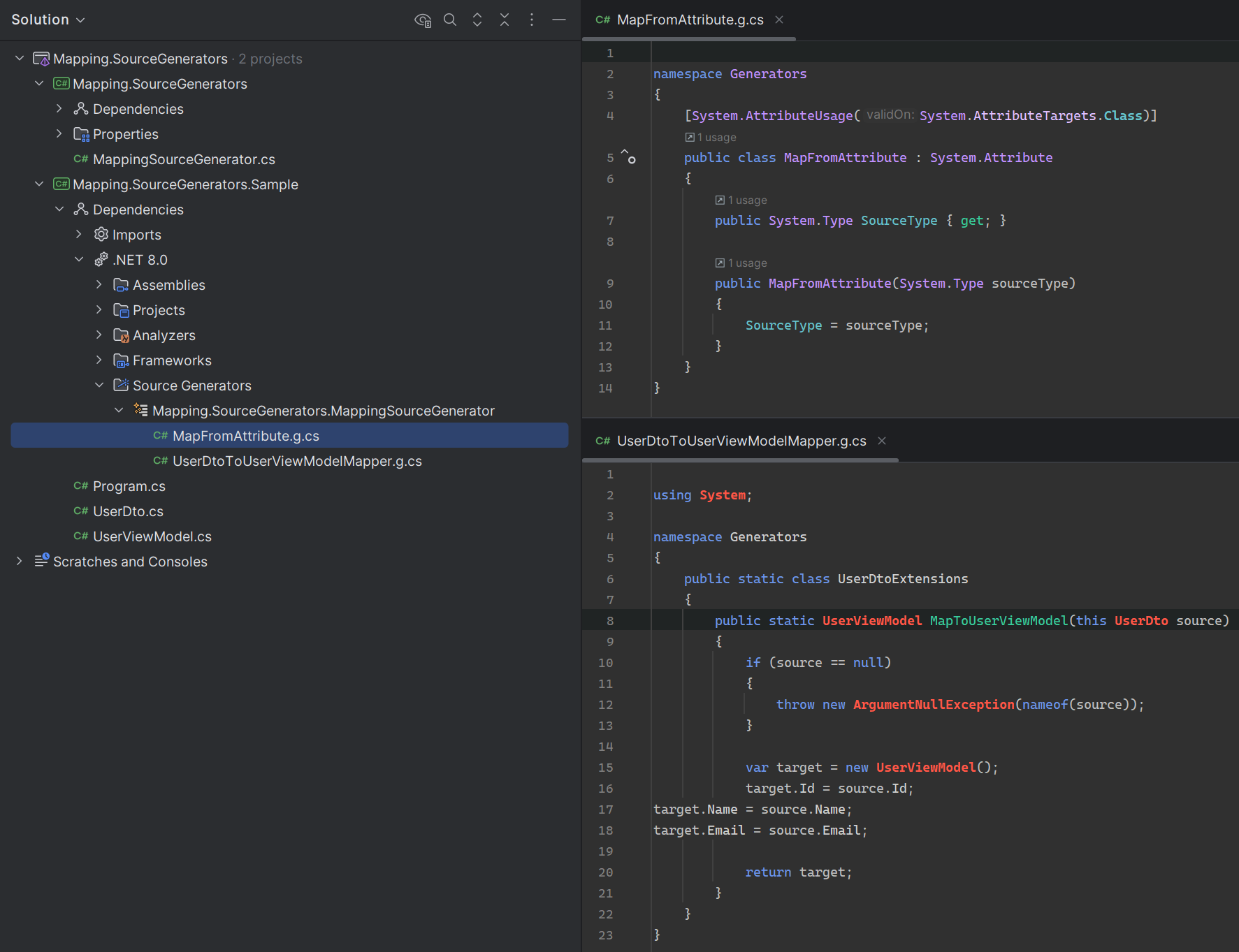
If everything is set up correctly, after you build the solution you'll see the generated mapper code, plus the attribute the generator uses to find models.
Advantages of using Source Generators
The code is generated once, at compile time, so there's no runtime overhead and no reflection delays. Type errors show up at compile time, IntelliSense fully sees the generated methods, and refactoring works the same as with any other code.
You can open the generated code and debug it like anything else. The generator is easy to extend, and the result is easier to test than reflection-based code.
Conclusion
Source Generators move routine work from runtime to compile time. The price is a separate generator project and some time spent learning the Roslyn API. In return you get fast code without reflection, type checks at build time, proper IDE support, and a generator you can extend for your own needs.
Compared to T4, PostSharp or reflection, Source Generators are faster and safer, and they're no harder to work with.